
Some Canadian residents seek a bank account which accepts USD.
If the person you're sending money to falls into this category, we're happy to help you set up your recipient details to reflect this.
| Please note: This process only applies to our users who are registered with us in North America. |
How to add a recipient with a USD bank account in Canada using the app
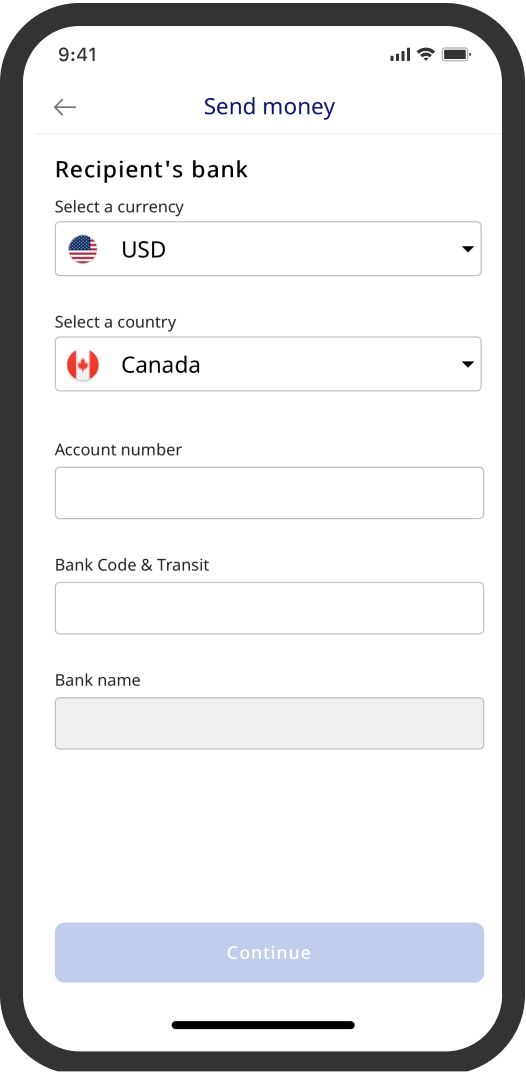 If you want to add a USD bank account for a Canadian recipient, please follow these instructions if you're using our app.
- Open the Xe app and go to More, followed by Recipients.
- Hit the Add Recipient button.
- Choose whether you're paying yourself or someone else.
- Provide their full name and a nickname (optional).
- Select USD as the currency and Canada as the country.
- Enter the recipient's account number (typically 7-12 digits).
- Fill in the Bank Code & Transit field (typically 3 digits and 5 digits respectively). This should always be preceded by a 0 to give you a total of 9 digits.
- Click Continue to add your recipient's address and complete the process.
|
Important: If you encounter problems with the Bank Code & Transit field, please double check there is a 0 at the start of your digits. You should have 9 digits in total in this field. Your completed Bank Code & Transit field should follow this format 0XXXYYYYY where X is the Bank Code number and Y is your recipient's transit number. This 9-digit number is also sometimes called a routing number. |
How to add a recipient with a USD bank account in Canada using the website (click to expand)
If you want to add a USD bank account for a Canadian recipient, please follow these instructions if you're using our website.
- Log in to your Xe account and select Recipients from the side menu.
- Click Add recipient.
- Choose Bank account.
- Choose who you're sending money to (yourself, someone else or a business).
- Enter the recipient's name.
- Enter the following:
-
- Currency: USD
- Location of bank: Canada
- If you're not sending to your own account, please enter the address of the recipient
- Enter the recipient’s account number (typically 7-12 digits).
- Fill in the Bank Code & Transit field (typically 3 digits and 5 digits respectively), adding an additional 0 at the start, giving you a total of 9 digits.
- Add your reason for payment and any other optional fields you wish to provide information for to help you locate your transfer more easily.
- Click Save Recipient and you're all set.
|
Important: If you encounter problems with the Bank Code & Transit field, please double check there is a 0 at the start of your digits. You should have 9 digits in total in this field. Your completed Bank Code & Transit field should follow this format 0XXXYYYYY where X is the Bank Code number and Y is your recipient's transit number. This 9-digit number is also sometimes called a routing number. |
Comments
0 comments
Article is closed for comments.